Table of Contents
BBS Directory
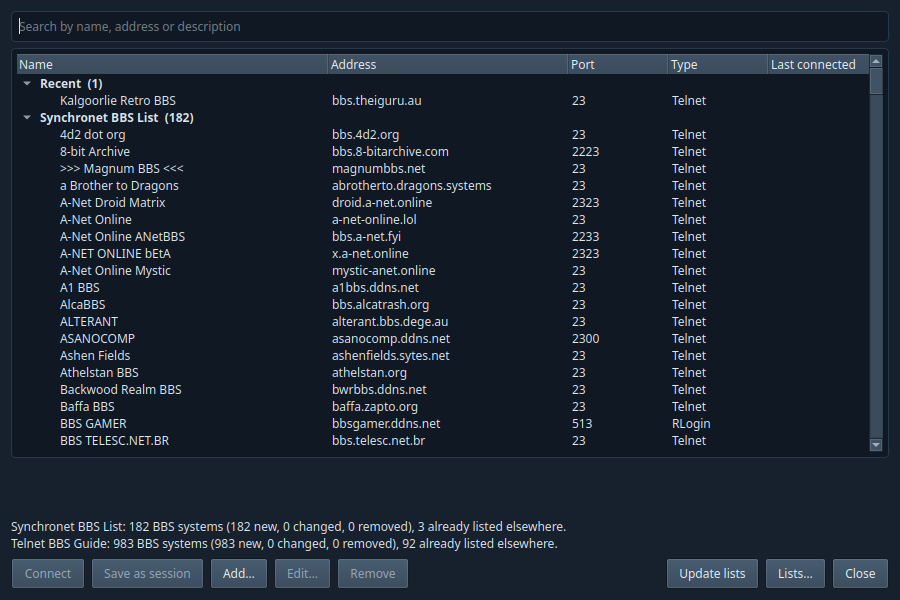
The BBS Directory (new in 0.6.0) is a dialling directory of BBS systems. Open it with the BBS Directory button on the toolbar, or Tools → BBS Directory….
Getting the lists
Press Update lists to download the Synchronet BBS List and the Telnet BBS Guide; lists are downloaded only when you press it, and the server is asked to send a list only if it has changed. The Synchronet list comes from the Kalgoorlie Retro BBS website (https://retro.theiguru.au/bbslist/synchronet.lst), refreshed daily from Synchronet's own BBS list with Telnet first; the Telnet BBS Guide comes from syncterm.bbsdev.net. Lists… changes, adds or removes list addresses (any list in the SyncTERM .lst format).
- Recent is at the top: the Kalgoorlie Retro BBS first, then every BBS you have connected to, newest first. Below it are Your BBS systems (ones you added) and then one group per list. Type in the search box to find a BBS by name, address or description; the description of the selected BBS shows under the list.
- Connect (or double-click, or Enter) opens the BBS in a new tab with the BBS settings: CP437, ANSI-BBS, VGA font, 80×25. Nothing is added to the Sessions pane unless you press Save as session, which saves it at the top level like any other session.
- A BBS that offers only SSH asks first. SSH logs in with your user name on that BBS, so it only works if you already have an account there. Connect with Telnet (the default) shows the BBS's own login screen, where you can log in or sign up as a new user; or choose Connect with SSH and type your user name. The choice is remembered for that BBS.
- Updating a list adds new BBSes, and updates or removes the listed ones you have never used. BBSes you have connected to are left alone; if the list gives one of them a new address, the directory says *new address in list* and Use new address switches to it. Your own entries are never changed. A BBS that is in both lists, or matches one of your own, is shown once.
- Add… a BBS by hand (name, connection type, address, port, user name, description); Edit… and Remove change or delete your own. For a listed BBS, Copy and edit… makes your own copy, and Remove from Recent puts it back in its list.
- The directory is kept in
bbs-directory.jsonin the profile folder, and downloaded lists inbbs-lists/. Tools → New BBS session… and Tools → Import BBS list still work as before.
Where the Synchronet list comes from
Synchronet BBSes share their BBS list with each other through Synchronet's list network, and each BBS records every way to connect (Telnet, SSH, RLogin and others). The copy of that list published for SyncTERM keeps one connection per BBS and puts SSH first, which needs an account on each BBS. The Kalgoorlie Retro BBS receives the same list every day, exports it with Synchronet's own sbbslist.js with Telnet first, and publishes it at https://retro.theiguru.au/bbslist/synchronet.lst (refreshed daily). Most BBSes therefore come in as Telnet, with the BBS's own login and new-user screens.
Related
- Saved sessions (BBS sessions, Apply BBS settings, RLogin, importing a SyncTERM list)
- File transfers (Zmodem with BBSes)